
Getting the best value from your AI token spend
AI token costs are climbing and spending caps are tempting. Five levers cut your cost per completed task before you start rationing.


For the last couple of years, organisations have been encouraging their people to use AI: find the productivity gains, get rid of the drudge work, experiment. It worked. People have discovered what agents can do, and in some places it’s working almost too well. Token costs are ballooning, finance teams are asking questions, and some organisations are reversing course with hard spending caps.
Sometimes a cap is the right call; it brings spend under control without anyone noticing a difference. Other times it’s a real handbrake on work that was paying for itself. Before reaching for the cap, it’s worth checking whether you’re paying more per token than you need to. In our experience, five levers make the biggest difference.
Use subscription plans wherever you’re eligible
If your organisation qualifies for a subscription plan like Claude Team or ChatGPT Business, use it. The economics are hard to argue with: for the same volume of tokens, a subscription typically works out something like 6 to 10 times cheaper than metered API usage, and for heavy users the gap can be far wider. Looking at my own usage last month, the tokens I consumed would have cost around US$1,800 at API rates. My subscription cost US$100.
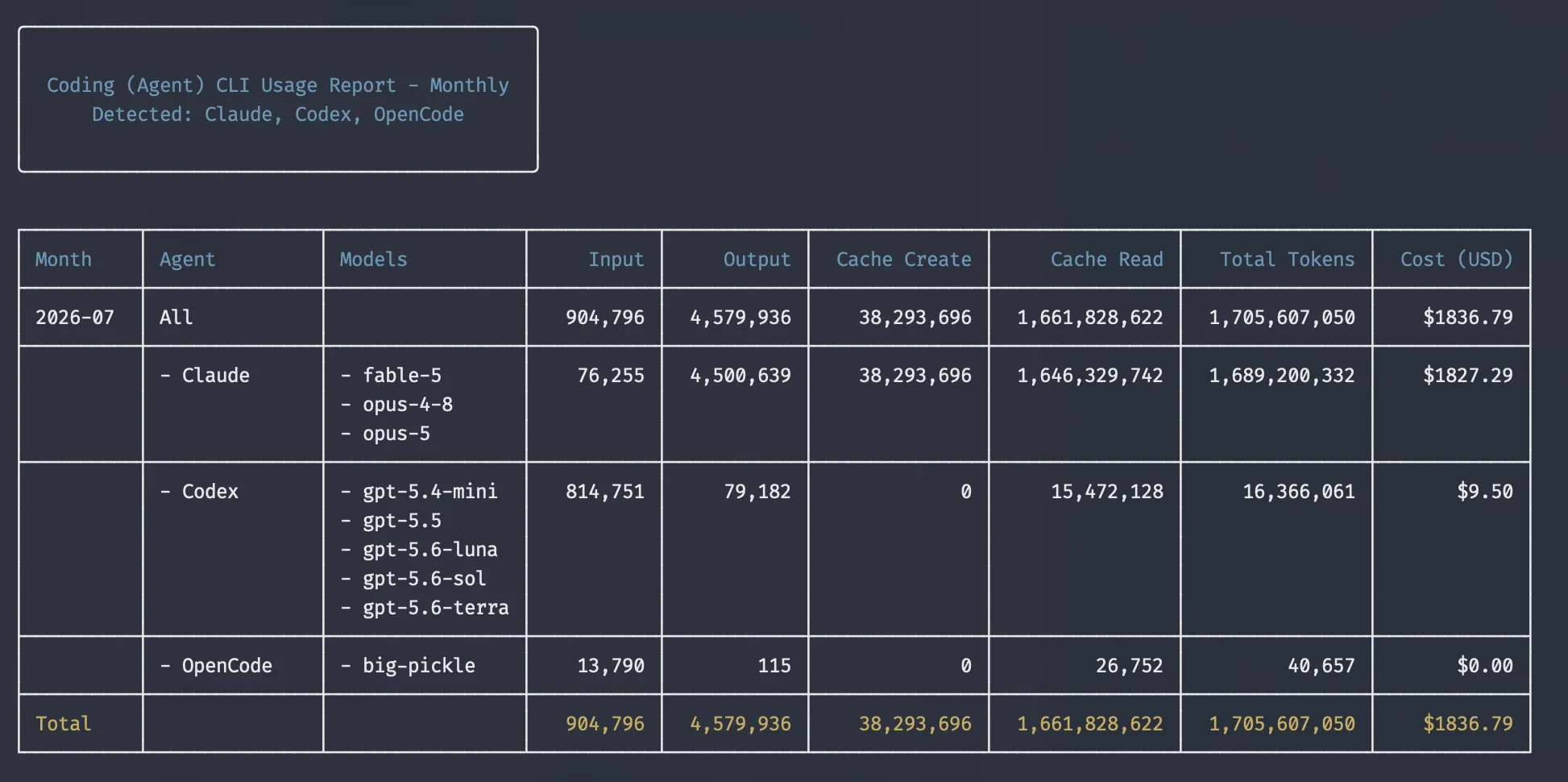
For your serious users, you’ll want Premium seats. They’re available now on Claude Team and rolling out on ChatGPT Business, and at around US$100 to $150 a month they’re far better value than a $20 standard seat plus overage billed at API rates. The useful part is that you can mix seat types within one plan: a handful of Premium seats for your heaviest users, standard seats for everyone else, and you adjust as usage patterns become clear. That makes it a low-barrier model to adopt.
One caveat: these plans have seat limits. Claude Team, for example, tops out at 150 seats before you’re moved onto Enterprise, where usage beyond your allocation is typically billed at standard API rates. If you’re a large enterprise above those thresholds, you won’t be able to take full advantage of the subsidy built into the subscription tiers, and the efficiency levers below matter even more.
Match the model to the task, not the price per token
Another tempting lever is dropping to a smaller model with a lower price per token. The trouble is that your bill is driven by cost per completed task, and the two can point in opposite directions. A smaller model often takes more turns to get there, retries more failed approaches, and sometimes fails the task outright; a failed run costs you every token it burned, plus the rerun, plus someone’s time sorting it out. This is well documented: Artificial Analysis benchmarks agents on cost per completed task for exactly this reason, and the Allen Institute for AI’s AstaBench study found that agents built on models priced 3 to 25 times cheaper per token ended up roughly twice as expensive per task, taking more steps and getting stuck in loops, while also performing worse. Match the model to the task, then measure what a finished task costs you, rather than what the pricing page says.
Put what you know into skills and context files
Day to day, the biggest driver of token spend isn’t the tasks your agents complete; it’s everything they figure out along the way. An agent without good instructions will rediscover your conventions from scratch every session: probing your systems, hitting an error, reading the error, trying again. Each of those loops burns tokens, and they compound across every person and every task.
The fix is to encapsulate what you know into skills and context files: how your systems work, what the conventions are, which approaches to use and which to avoid. The more you write down once, the less your agent has to work out on the spot, every time. Of everything on this list, this is the change we see move the needle most.
If a task can be scripted, get the agent to write the script
When an agent operates APIs directly, it reasons through every call: read the response, decide the next step, handle whatever comes back. For a one-off task that’s fine. For a task you run weekly, it means paying full reasoning cost on something that stopped needing reasoning after the first run.
Instead, have the agent write a script the first time, then run the script from then on. The thinking happens once; the repetition is nearly free. It’s a small habit change that turns your most repetitive workflows into your cheapest ones.
Automating a browser? Prefer DOM navigation over screenshots
If your automation needs a browser, how the agent “sees” the page matters a lot. Screenshot-based approaches, common in browser extensions, send images into the model’s context and rely on vision to work out what to click, which is expensive and imprecise. Tools like Playwright instead hand the agent a structured text snapshot of the page: a few hundred tokens per page rather than thousands, with every element carrying a stable reference the agent can act on deterministically. Same task, a fraction of the tokens, and fewer failed attempts to pay for on top.
Caps treat the symptom; efficiency treats the cause
A spending cap tells your people to use AI less. The levers above let them use it just as much, for a fraction of the cost: the right plan, the right model for the task, well-built skills and context, scripts for the repeatable work, and efficient browser automation. If your token bill is climbing, start there before you start rationing.
We help organisations get more from the same token spend
-
Talk to us
A 30-minute call about where your token spend is going and which levers are worth pulling first.
-
See customer stories
Production deployments across sectors, from knowledge agents to bespoke builds.
-
The Agent-Native Blueprint
Skills and context are the biggest lever on this list. The Blueprint takes them across a whole organisation: shared context, secure access, and governance.